Understanding the Linux Kernel Driver Structure
How Linux kernel drivers connect user-space software to hardware through system calls, MMIO, DMA, and interrupts.
A Linux kernel driver is the layer that connects user-space software to a hardware device. It translates an application’s request into operations that the hardware can perform, then reports the result back to user space.
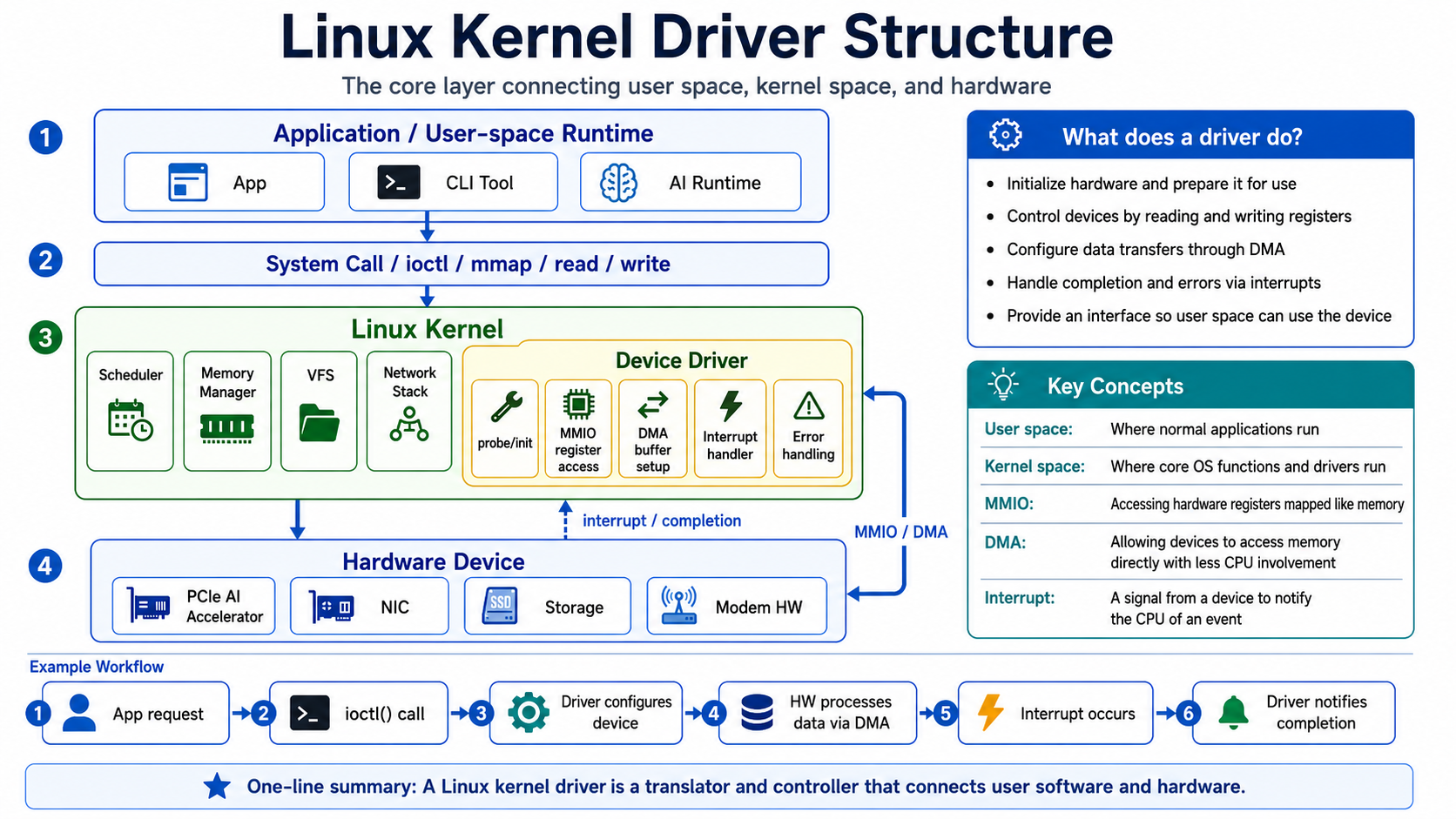
The diagram below shows the complete path: a request starts in an application, crosses into the Linux kernel through a system call, reaches the hardware through a device driver, and returns as a completion event.
1. The Overall Structure
The diagram divides the system into four layers:
- Application / User-space Runtime
- System Call Interface
- Linux Kernel and Device Driver
- Hardware Device
Software in the upper layers does not control hardware directly. A user-space request crosses into kernel space through a system call, and the device driver converts that request into device-specific operations.
2. Application / User-space Runtime
User space is where ordinary applications run. The diagram gives three examples:
- Application
- CLI tool
- AI runtime
These programs do not directly manipulate device registers or DMA buffers. Instead, they request hardware services through interfaces exposed by the operating system. This separation allows an application to use a device without knowing every detail of its internal implementation.
3. System Call Interface
System calls form the boundary between user space and kernel space. The diagram includes four common interfaces used to interact with a device driver:
read()reads data from a file or device.write()writes data to a file or device.ioctl()sends device-specific control commands that cannot be expressed as simple reads or writes.mmap()maps memory managed by the kernel or device into a process’s address space.
When an application invokes one of these interfaces, execution enters kernel space and the kernel dispatches the request to the corresponding driver operation.
4. Linux Kernel and Device Driver
4.1 What Does Linux Kernel Do?
The Linux kernel provides the system’s core operating-system functions. The diagram highlights the following components:
- Scheduler: Decides when processes and threads run on the CPU.
- Memory Manager: Manages system memory and each process’s virtual memory.
- Virtual File System (VFS): Provides a common file interface for different file systems and devices.
- Network Stack: Handles network protocols and packet processing.
- Device Driver: Initializes and controls a specific hardware device.
Among these components, the device driver is the part that directly interfaces with hardware. It translates a general request from user space into operations such as register access, buffer setup, interrupt handling, and error handling.
4.2 What Does a Device Driver Do?
The diagram summarizes the driver’s responsibilities in five areas.
-
Device Discovery and Initialization (
probe/init):
The driver detects the device and prepares it for use. This includes acquiring the required kernel resources and placing the device into an initial operating state. -
MMIO Register Access:
Memory-Mapped I/O (MMIO) maps hardware registers into an address range that software can access like memory. The driver reads and writes these addresses to inspect device state and control device behavior. -
DMA Buffer Setup:
Direct Memory Access (DMA) allows a device to transfer data to or from memory without continuous CPU involvement. The driver prepares the buffers and configures them so that the device can use them for DMA transfers. -
Interrupt Handling:
An interrupt is a signal from hardware that notifies the CPU of an event, such as work completion or a state change. The driver’s interrupt handler receives the signal and performs the required follow-up processing. -
Error Handling:
The driver also detects and handles errors during device operation. It may inspect error status, attempt recovery, or report the failure to user space.
5. Hardware Device
The physical hardware sits below the device driver. The diagram shows several examples:
- PCIe AI accelerator
- NIC (Network Interface Card)
- Storage device
- Modem hardware
Although these devices serve different purposes, Linux controls them through the same general structure. The driver controls the device through MMIO and configures data movement through DMA. When work completes or another event occurs, the device signals the driver through an interrupt.
6. Example Request Flow
The example workflow in the diagram follows a request through six steps:
- An application submits a request.
- The application passes the request to the kernel through an
ioctl()call. - The driver configures the device for the requested operation.
- The hardware processes data through DMA.
- The hardware raises an interrupt when the operation completes.
- The driver reports completion to user space.
The request travels downward from user space to the hardware, while the completion signal travels upward from the hardware to the driver. The device driver connects these two directions while managing device control and state.
7. Summary
A Linux kernel driver is both a translator and a controller between user-space software and hardware. It exposes an interface that applications can use and turns software requests into hardware operations using MMIO, DMA, and interrupts.
The path can be summarized as:
Application → System Call → Linux Kernel / Device Driver → Hardware Device
Completion events travel back to the driver through interrupts. Understanding these layers and this request flow provides the basic picture of how software requests become hardware operations in Linux.